A URL redirection service helps teams route traffic as websites, campaigns and domains change. Whether you are managing a website migration, consolidating domains, updating campaign links, protecting SEO value or redirecting outdated pages, the right service makes sure users and search engines reach the correct destination.
Redirects may look simple, but they often sit in the critical path between a visitor and the content they are trying to access. If redirects are slow, unreliable, misconfigured or hard to manage, they can create broken user journeys, lost campaign traffic, SEO issues and unnecessary work for IT, WebOps, marketing and SEO teams.
A best-of-breed URL redirection service should provide more than basic link forwarding. It should handle business-critical redirect delivery, HTTPS handling, advanced path and query forwarding, performance, governance, security regulations and team workflows that help organizations manage redirects reliably at scale.
What is a URL redirection service?
A URL redirect service operates as an intermediary service that receives a request for one URL and automatically forwards visitors to a different destination. The process happens quickly and seamlessly from the user's perspective, though the redirect does add one extra HTTP round trip before the destination loads.
When someone visits a redirected URL, many managed redirect services record request data for analytics and troubleshooting, generally without adding delay to the redirect itself. That data commonly includes the timestamp, approximate location, device information and, where the browser sends it, the referring source, which the service stores for later reporting.
The technology behind URL redirect services relies on HTTP status codes, primarily 301 and 302 redirects. A 301 redirect indicates a permanent move, signalling to search engines that the destination should become the canonical URL and that ranking signals should consolidate there. A 302 redirect signals a temporary change. Google's indexing pipeline does not treat the destination as canonical, so the original URL generally stays the one shown in search results.
Choosing the right redirect type matters most during migrations, rebrands and campaign changes, when the wrong one quietly sends the wrong URL into search results. A capable redirect platform should let teams set the redirect type explicitly per rule and control how paths and query parameters carry through, so each redirect produces the user and SEO outcome you intended rather than a default you did not choose.
What matters when selecting a URL redirector service
Each service provider has different strengths and weaknesses depending on what your company requires. There are more providers to choose from all the time. Once you have narrowed down the service level your organization needs, consider how each option’s reliability, performance, cost, features and security standards can support your business goals.
Reliability and performance
Redirect reliability matters because redirects often sit between the visitor and the content they are trying to reach. When that redirect layer fails, the final destination may still be online, but users can still end up blocked from getting there.
For lower-risk redirects, a brief outage may not create a major business impact. But when redirects support paid traffic, migrations, branded links, high-value pages or critical domains, uptime becomes a core requirement, not just a technical detail.
Pricing
Pricing can be difficult to compare because redirect platforms often measure usage in different ways. One tool may price around source URLs, while another may factor in traffic volume, domains, seats, analytics retention, API access or enterprise controls.
The lowest monthly price is not always the lowest total cost. A plan that looks inexpensive at first may become limiting if it caps redirect volume, restricts path-level rules, gates team features or charges more for capabilities your team needs later.
When comparing redirect platform pricing, look at what is included and what may require a higher plan:
- How many source URLs are included?
- Are page-level redirects or partial path rules limited?
- Is traffic capped or metered?
- Are team members included or priced per seat?
- Are analytics included and how long is data retained?
- Are bulk imports, API access, permissions, audit logs or SSO available on the plan you need?
- Are HTTPS, SSL/TLS certificate management and support included?
- Are uptime commitments or enterprise SLAs included?
For low-risk redirects, a free or lower-cost plan may be enough. But for business-critical URLs, migrations, campaigns or high-traffic domains, pricing should be evaluated against reliability, support, governance and the potential cost of downtime or broken redirects.
Features
When choosing a redirect platform, look beyond whether it can point one URL to another. The stronger question is whether it gives your team the tools to manage redirects securely, consistently and at scale.
Key capabilities to evaluate include:
- HTTPS support: Redirects should work over secure connections, with SSL/TLS certificate handling that prevents browser warnings and failed requests.
- HTTP-to-HTTPS upgrades: The platform should be able to route insecure HTTP traffic to the secure HTTPS version when needed.
- Apex and www support: Redirect behavior should be consistent across root domains and www versions.
- Path and query forwarding: Teams should be able to preserve paths and query parameters so users land on the right page and campaign tracking remains intact.
- Partial path matching: Related groups of URLs should be manageable with shared rules instead of one redirect per page.
- Bulk import and export: Larger projects should support spreadsheet uploads, exports and batch updates.
- Analytics and visibility: Teams should be able to monitor redirect usage, traffic destinations and rules that may need cleanup.
- Team permissions: Role-based access helps non-technical teams manage redirects without creating unnecessary risk.
- Audit logs: Redirect changes should be tracked, especially when they affect SEO, campaigns, migrations or high-value URLs.
- SSO: Access should be able to tie into your identity provider rather than relying on individual passwords.
These capabilities matter because redirect problems can create real business impact. HTTPS issues can block visitors before they reach the destination. Missing query forwarding can break attribution. Poor path matching can slow down migrations. Weak permissions and limited visibility can make it harder to manage redirects across teams.
A strong redirect platform should do more than create rules. It should give your team the control, security and visibility needed to manage redirects confidently as websites, campaigns and domains evolve.
Security
Security is an important consideration when choosing a URL redirect service because the platform may manage business-critical domains, redirect rules, user accounts, analytics and traffic data. A secure redirect service should protect both the infrastructure that routes traffic and the customer data stored inside the platform.
Look for a provider that follows strong security practices, including secure application design, encrypted data transmission, controlled access to production systems, regular monitoring and clear policies for protecting customer information.
Compliance standards help validate those practices. A SOC 2 report is an independent auditor's assessment of a provider's controls against the Trust Services Criteria included in the scope of that report. Security is always in scope. The other four criteria, availability, processing integrity, confidentiality and privacy, are optional, so a report only covers them if the provider chose to include them. Confirm which criteria a given report actually assesses rather than assuming all five.
GDPR matters for any organization handling personal data from users in the European Union. Redirect services are in scope because they log visitor data, typically including IP addresses, before forwarding the request. Three questions are worth asking. Where is that data stored, since a provider operating only in the EU and one operating across multiple regions carry different transfer obligations. Is a Data Processing Agreement available, since you need one in place with any processor handling personal data on your behalf. And how long are request logs retained, since indefinite retention of visitor IPs is hard to square with data minimization.
Governance sits alongside compliance. A redirect rule is a live traffic control, so the security question is not only how data is stored but who can change where visitors go. The permissions and audit logging covered above become security controls at this point, not just workflow features and SSO ties access to your identity provider rather than a shared password.
The best URL redirectors do more than route traffic. They help protect customer data, support compliance requirements, reduce security risk and give IT, security and compliance teams confidence that redirect infrastructure is being managed safely.
Top choices for URL redirect services in 2026:
Now that we’ve outlined what’s important when choosing a URL redirect service, let’s take a look at the main players in the space.
Quick comparison
| Service | Best for | Delivery model | Pricing | Free trial? | Free plan? |
|---|---|---|---|---|---|
| urllo | Business-critical redirects at scale | Managed (DNS or edge integration) | Priced by source URLs, unlimited traffic. | ✔ | ✖ |
| redirect.pizza | Simple, low-volume domain redirects | Managed (hosted forwarding) | Priced by source hostnames. | ✔ | ✔ |
| redirection.io | Developer and technical-SEO control | Proxy (self-hosted or managed instance) | Tiered by redirect rule ceiling, plus metered instances and bandwidth. | ✔ | ✔ |
| SiteDetour | Adaptive, per-visitor campaign redirects | Managed (hosted on AWS) | Charges by hosted domain names. | ✔ | ✖ |
| RedirHub | A free tier plus A/B routing or monitoring | Managed (hosted forwarding) | Permanent free tier, paid tiers request-metered | ✔ | ✔ |
urllo
Best for: teams where a redirect failing costs real money.
urllo, previously EasyRedir, has managed redirects since 2014. More than 1,000 companies across 75+ countries rely on it, from small teams through to enterprises and we handle more than 25 billion requests a year.
Reliability and performance
urllo runs its own global delivery network of 130+ points of presence with DDoS protection, typically exceeds 99.999% uptime historically and offers a 100% uptime SLA on enterprise. In our own third-party monitoring for May 2026, our monitored redirect endpoints recorded 100% uptime, no outages and a 295 ms response time.
Pricing
No free plan, but a 14-day free trial with no credit card required. Performance starts at $49 a month, scales from 25 to 50,000 source URLs and adds unlimited team members, bulk imports, 12 months of detailed analytics and API access. Enterprise is custom-quoted. Pricing is by source URLs with unlimited traffic on every plan, so a traffic spike never changes the bill.
Features
Automatic SSL/TLS on every plan, HTTP-to-HTTPS enforcement, apex and www handling, path and query forwarding and native partial path matching so one rule covers a group of URLs. Bulk import and export, analytics with lost-traffic reporting, an API, role-based access and audit logs are all included.
Beyond core redirects, we manage branded links, vanity URLs, dynamic QR codes and domain forwarding in one workspace. Our edge integration redirects specific URLs while the origin keeps serving everything else. urllo does not offer masked and iframe redirects because of the SEO and user-experience cost.
Security
urllo publishes a SOC 2 attestation, the report most procurement teams ask for, with encryption in transit and at rest, SSO as an add-on, two-factor authentication, role-based access and audit logs. It is GDPR compliant with a Data Processing Addendum available and raw analytics logs containing visitor IP addresses are automatically deleted after 30 days. urllo is not itself ISO 27001 certified, though the data centers it uses are.
Demo

Every redirect starts from the urllo dashboard. Click Create New Redirect to open the setup form and begin configuring a new redirect.
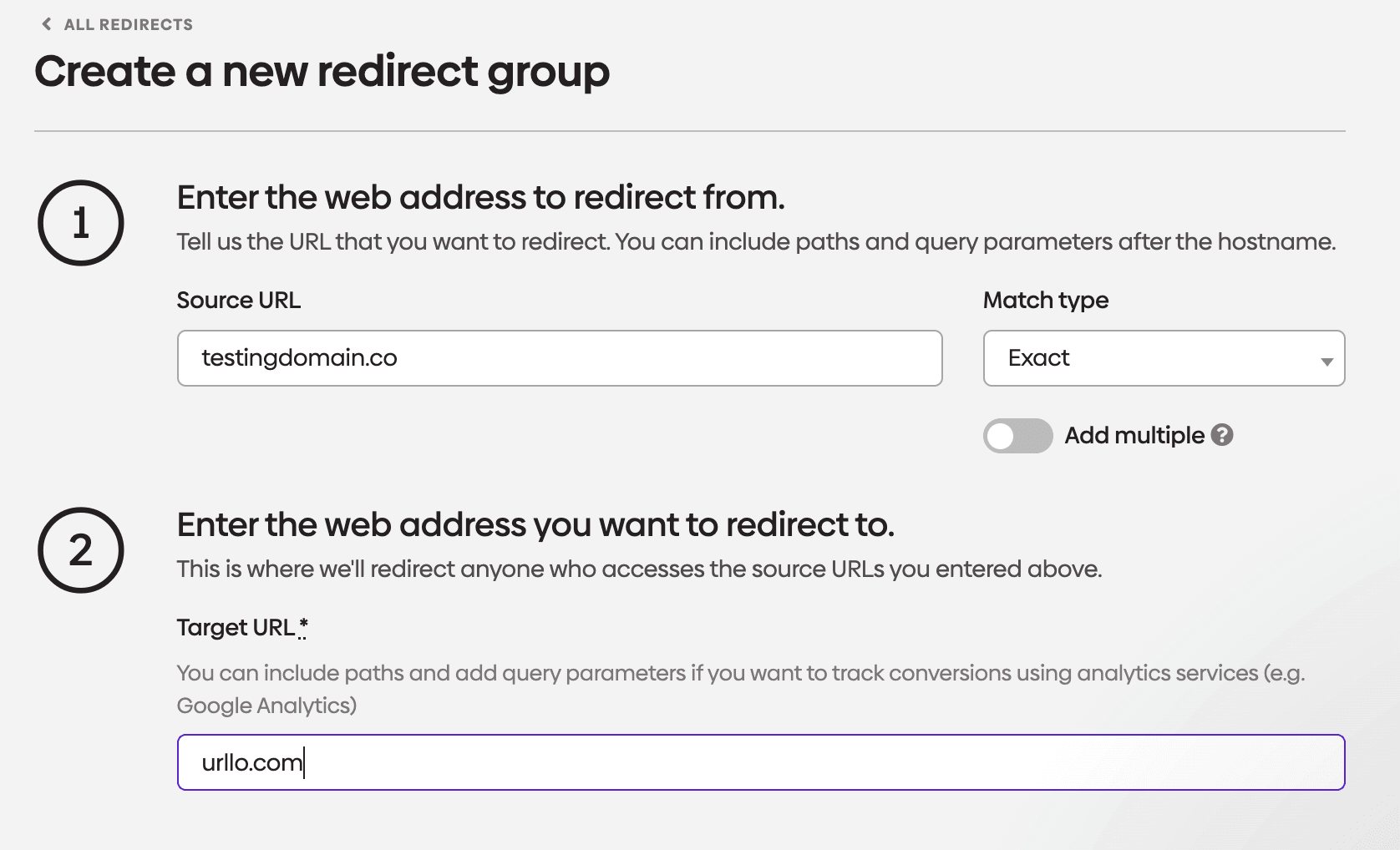
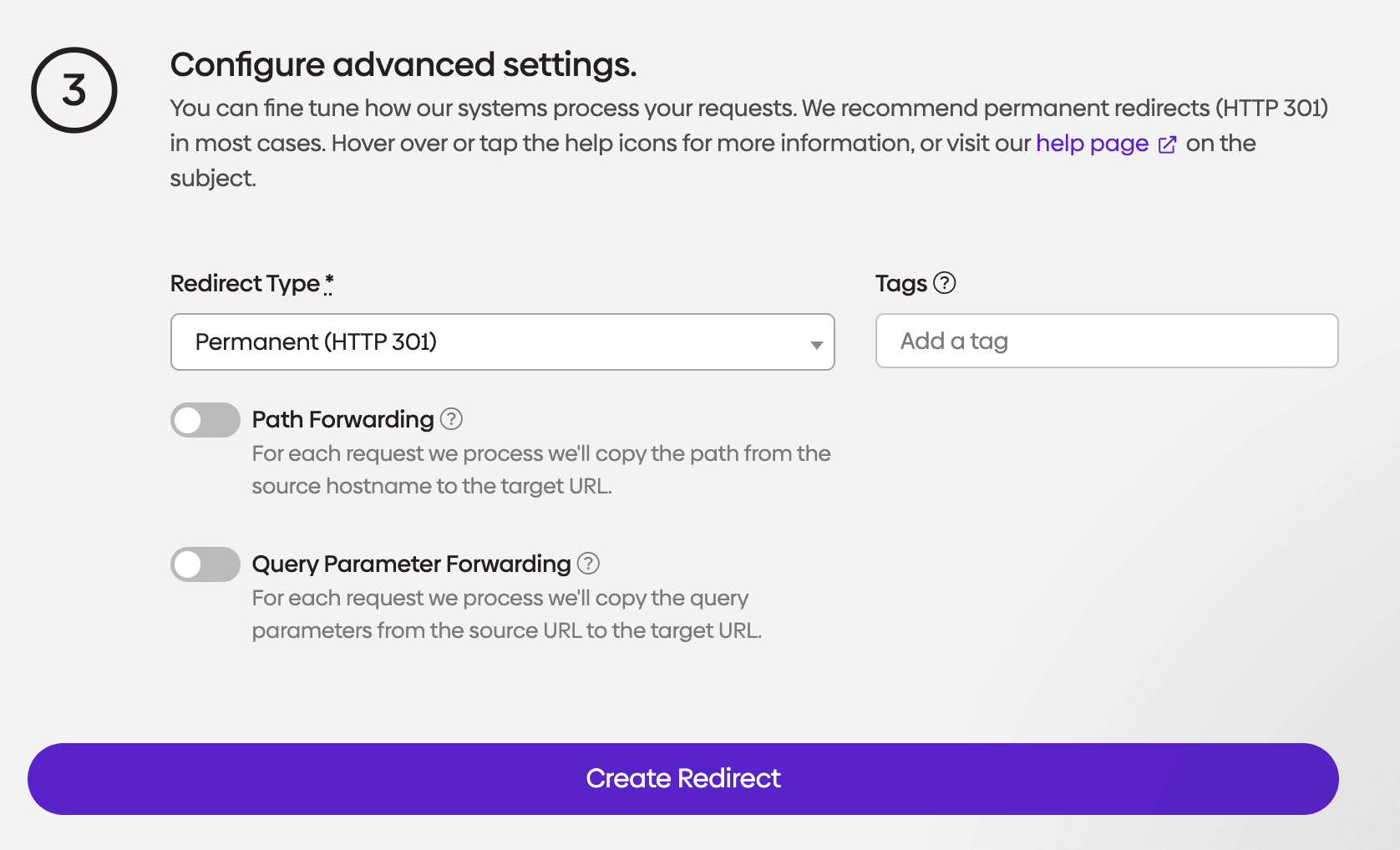
Fill in the source URL you want to redirect from and the destination target URL, choosing an exact or wildcard match type as needed. Below that, configure the advanced settings: pick a redirect type (301 permanent redirects are recommended for most cases) and decide whether to forward the original path and query parameters to the target. Click Create Redirect to save the group.
Once the redirect is created, urllo walks you through the DNS changes needed to point your domain at it. The values are marked pending until the DNS record is added at your registrar; in this example, Namecheap.
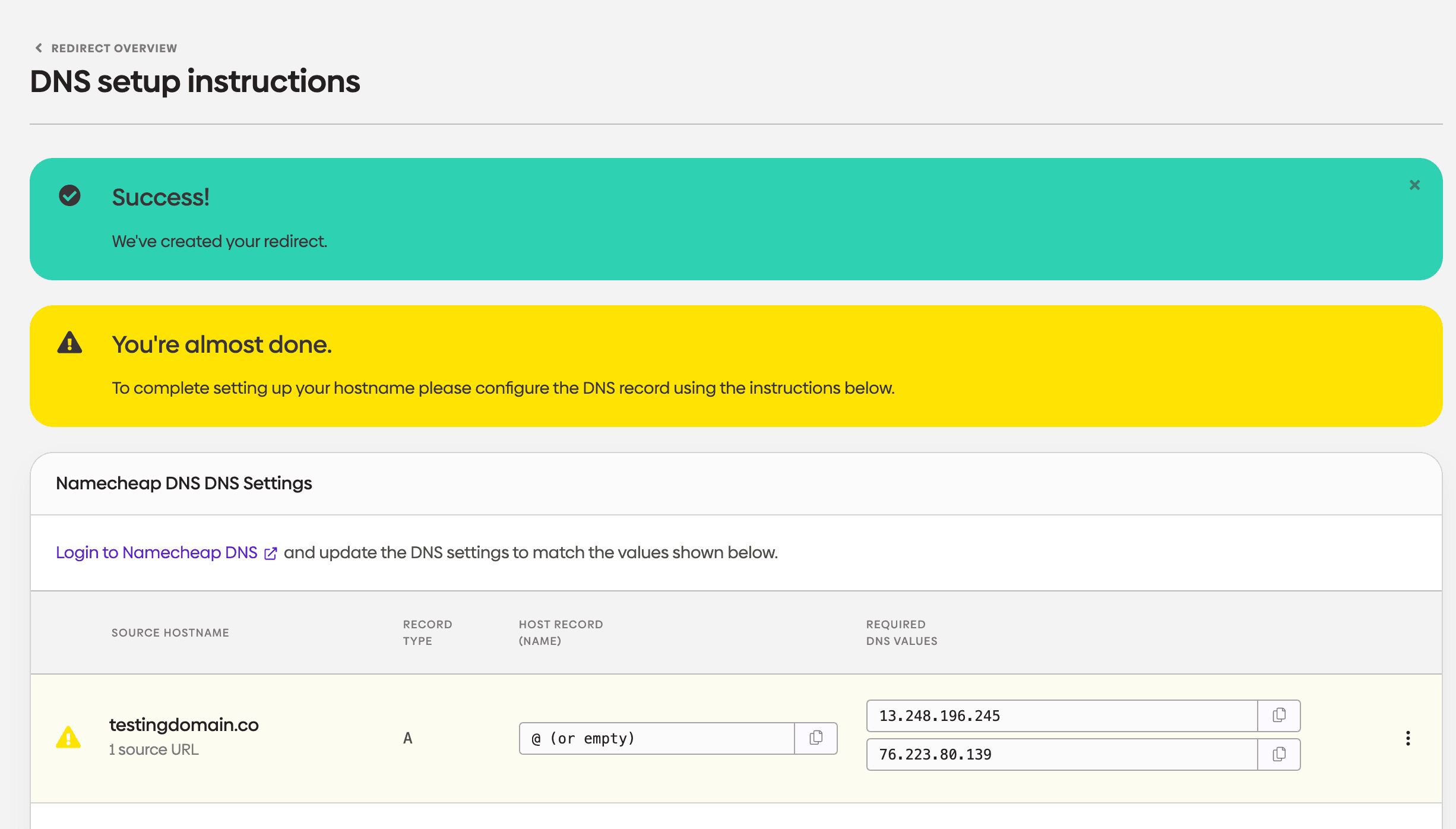
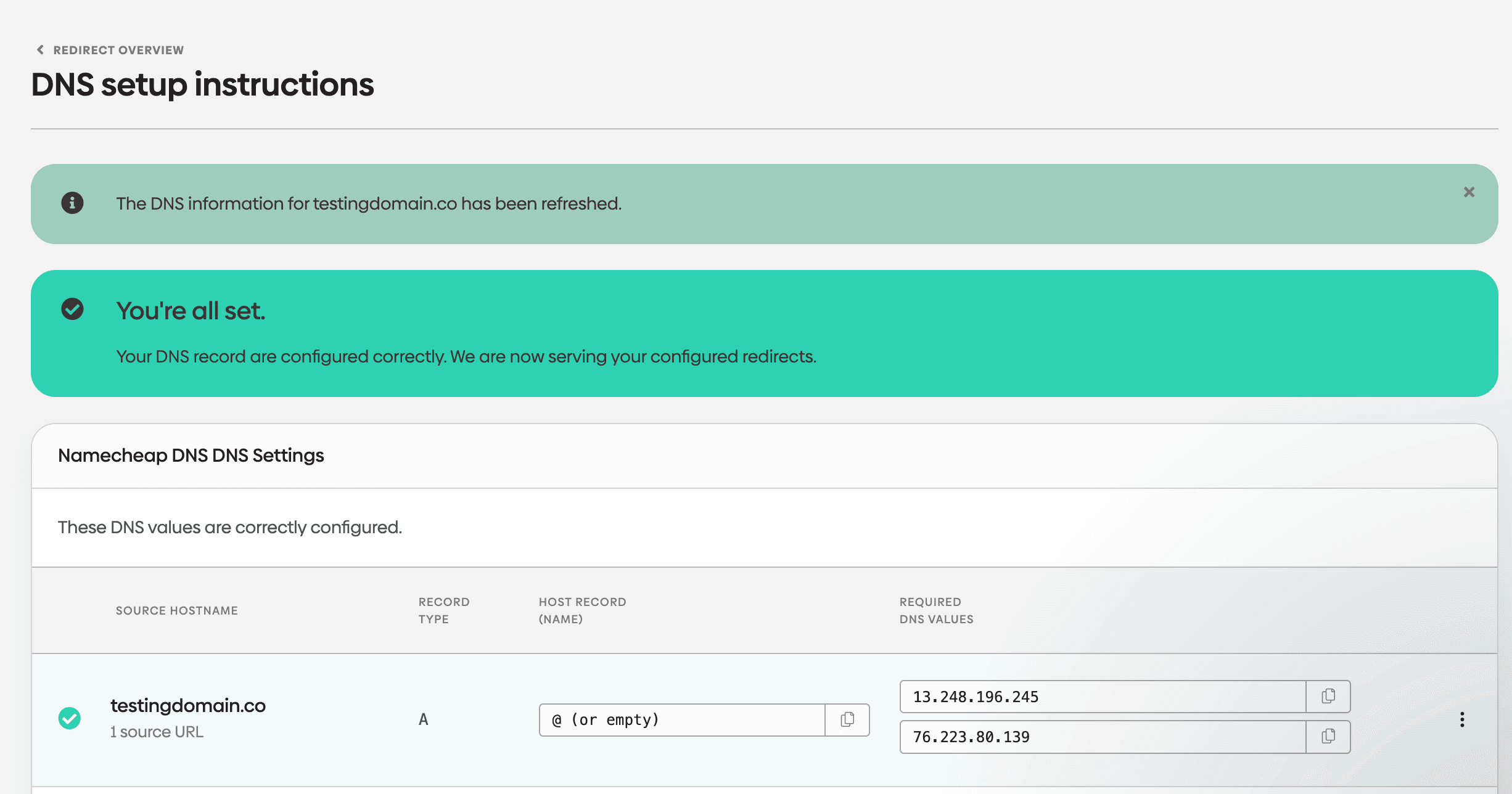
After the DNS record is added and has had time to propagate, refresh the page. Once urllo detects the correct values, the warning clears and the record is marked as correctly configured.
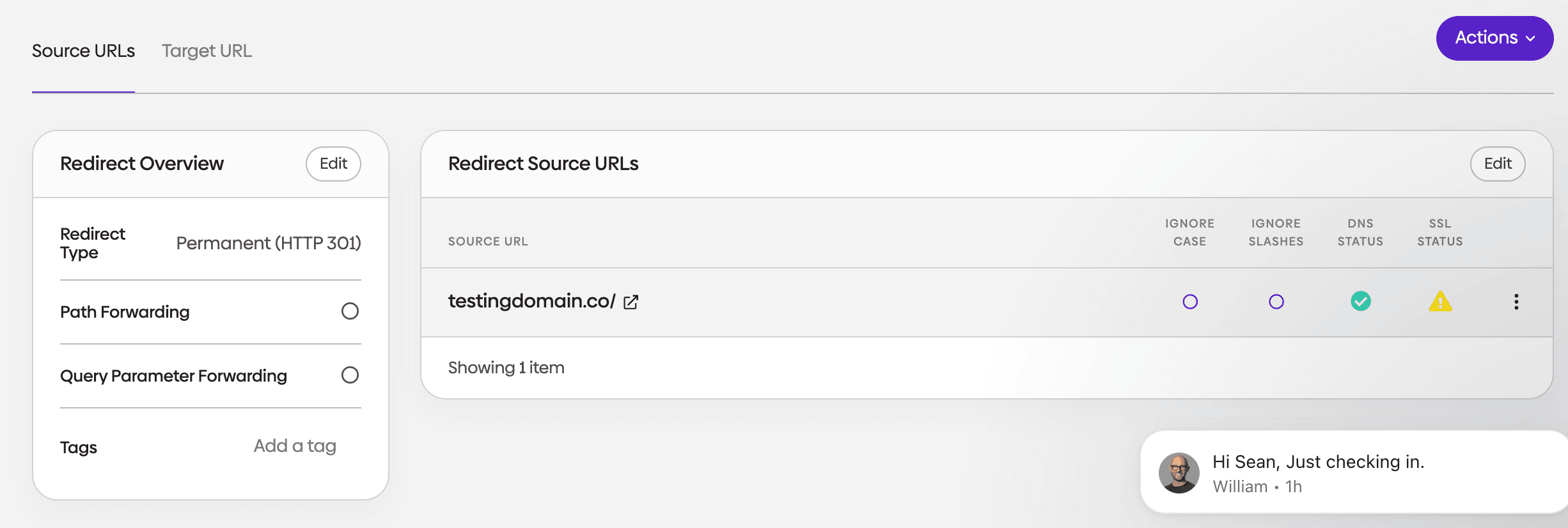
The finished redirect now appears in the overview screen, with its DNS status showing a green check. The SSL status icon may stay on a warning triangle for a little longer while urllo provisions the certificate for the new hostname and the support chat in the corner is there if anything looks off.
redirect.pizza
Best for: simple, low-volume domain redirects without much setup.
redirect.pizza is a hosted service focused on making basic domain redirection quick to set up, with automatic SSL so HTTPS works without manual certificate handling.
Full comparison: urllo vs redirect.pizza.
Reliability and performance
Hosted delivery with automatic HTTPS. In urllo's third-party monitoring for May 2026, redirect.pizza's tested endpoint recorded 99.94% uptime, five outages and a 1059 ms response time, against urllo's 100% uptime, zero outages and 295 ms, so urllo was roughly three and a half times faster over the month. redirect.pizza lists enterprise SLAs and a 100% uptime SLA, though its measured uptime that month was 99.94%. It does not publicly advertise dedicated DDoS protection or publish a historical uptime record and its network footprint is not public.
Pricing
Priced by source hostname allowance rather than per redirect: a free plan for light use, then Basic and higher paid tiers up to Enterprise, with the entry paid tier around $14.95 a month. Traffic is capped on the lower tiers, at 250,000 requests a month on free and 1 million on Basic and only becomes unlimited from Pro upward. The free plan is limited for anything past light use.
Features
Domain redirection, URL and cross-domain forwarding, path and query forwarding, partial path matching, automatic HTTPS with SSL handling, an API, SSO, audit logs and detailed analytics. It does not offer edge integration, so it cannot redirect selected URLs while the rest of a site keeps serving from the origin and it has no DDoS protection. It suits personal projects and small multi-domain setups more than governed, high-traffic programs.
Security
ISO 27001:2022 certified and completed SOC 2 Type 2 in April 2024, with both reports requestable through a public trust center. As a European company, it processes and stores data within Europe and has a named Data Protection Officer, alongside a published subprocessors list. That is a strong fit for EU-based operations, but data is held in Europe only with no US residency option, which rules it out for US organizations required to keep their data in the US, including public sector and government teams.
Demo
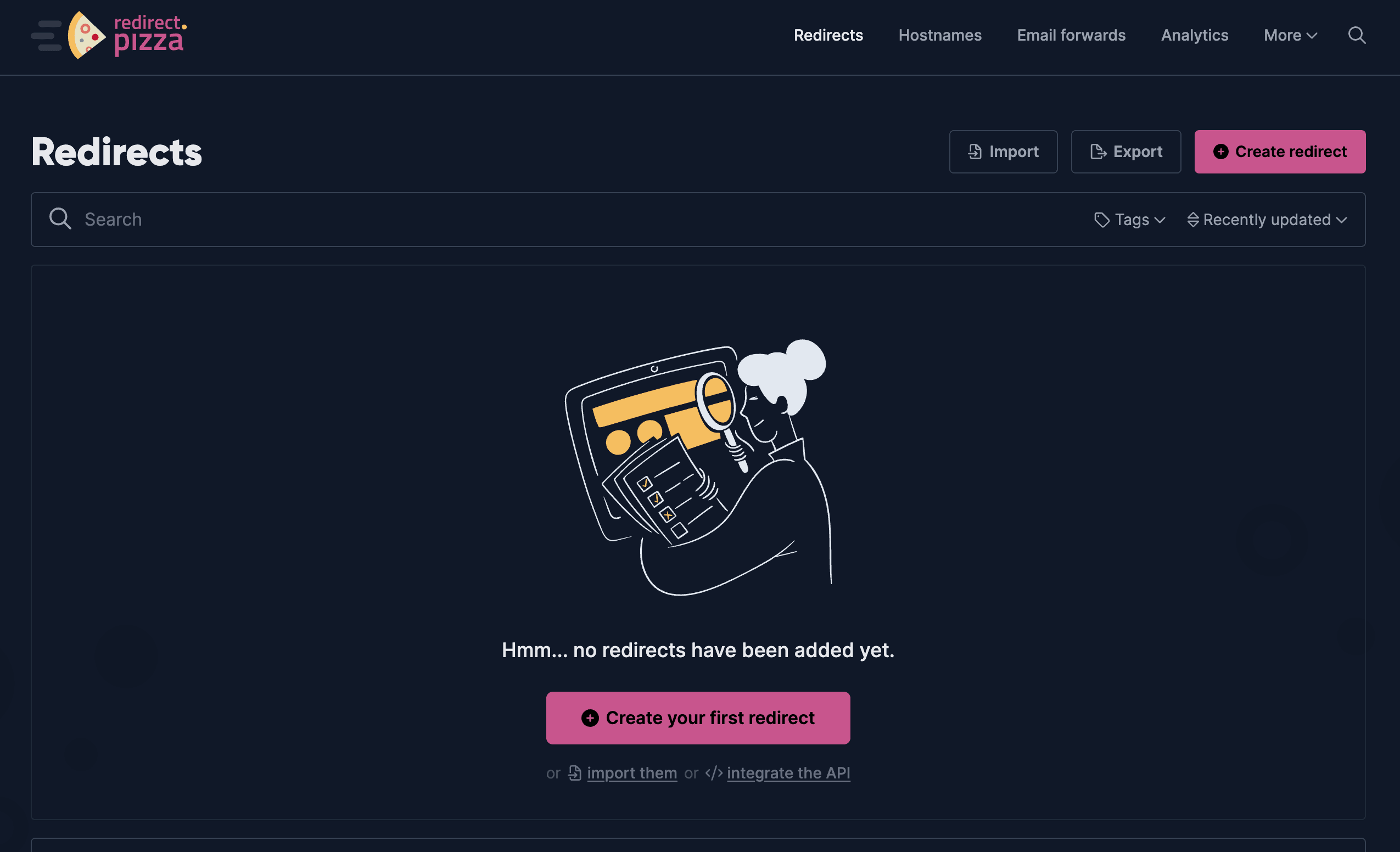
A new redirect.pizza account starts with an empty Redirects list. Click Create redirect to set one up or use the import or API links if you are migrating existing rules in bulk.
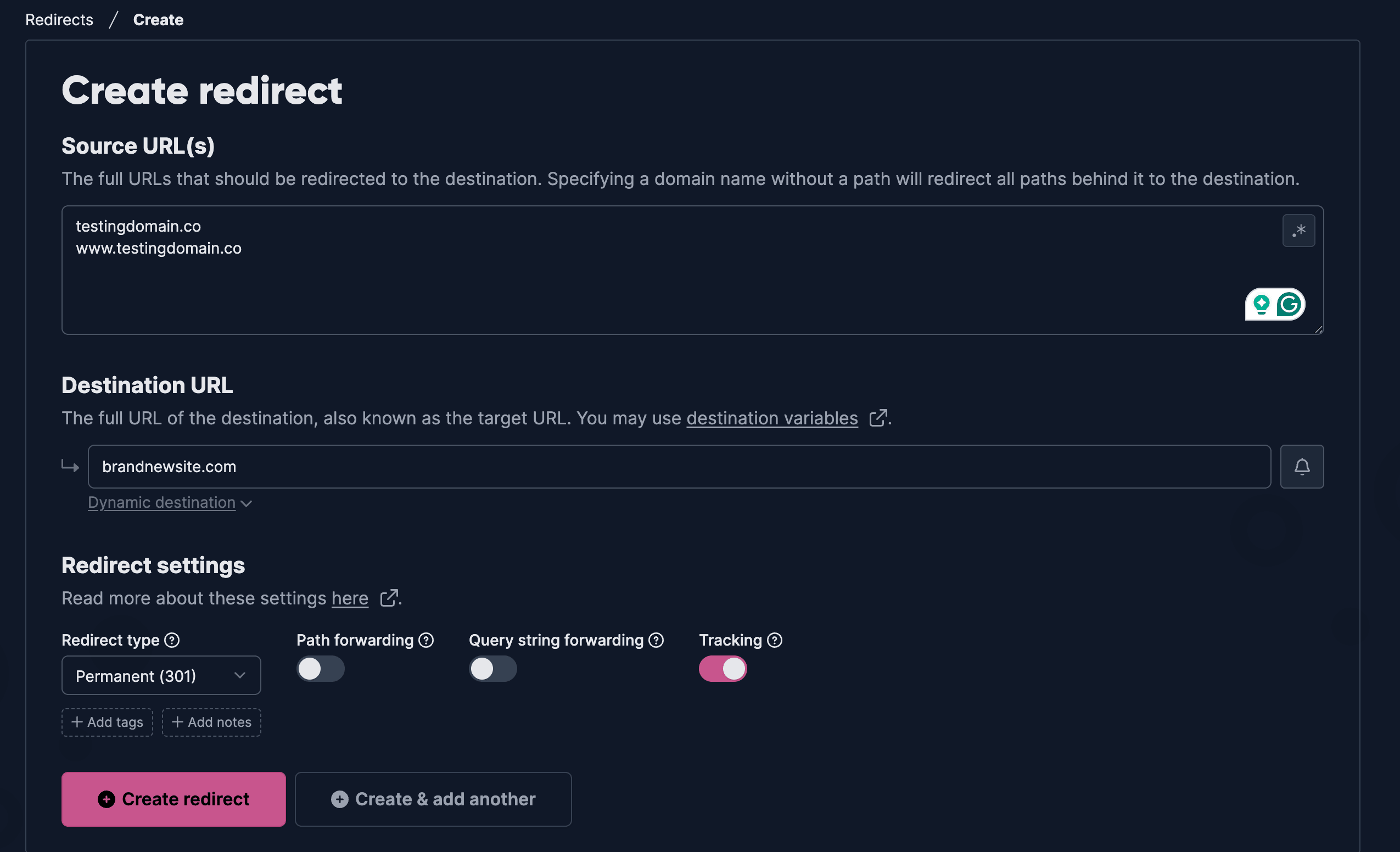
Enter one or more source URLs and the destination URL, then choose the redirect type and whether to forward the path, query string and tracking parameters. Clicking Create redirect saves the rule and opens its detail page, where redirect.pizza lists the DNS records you still need to add.
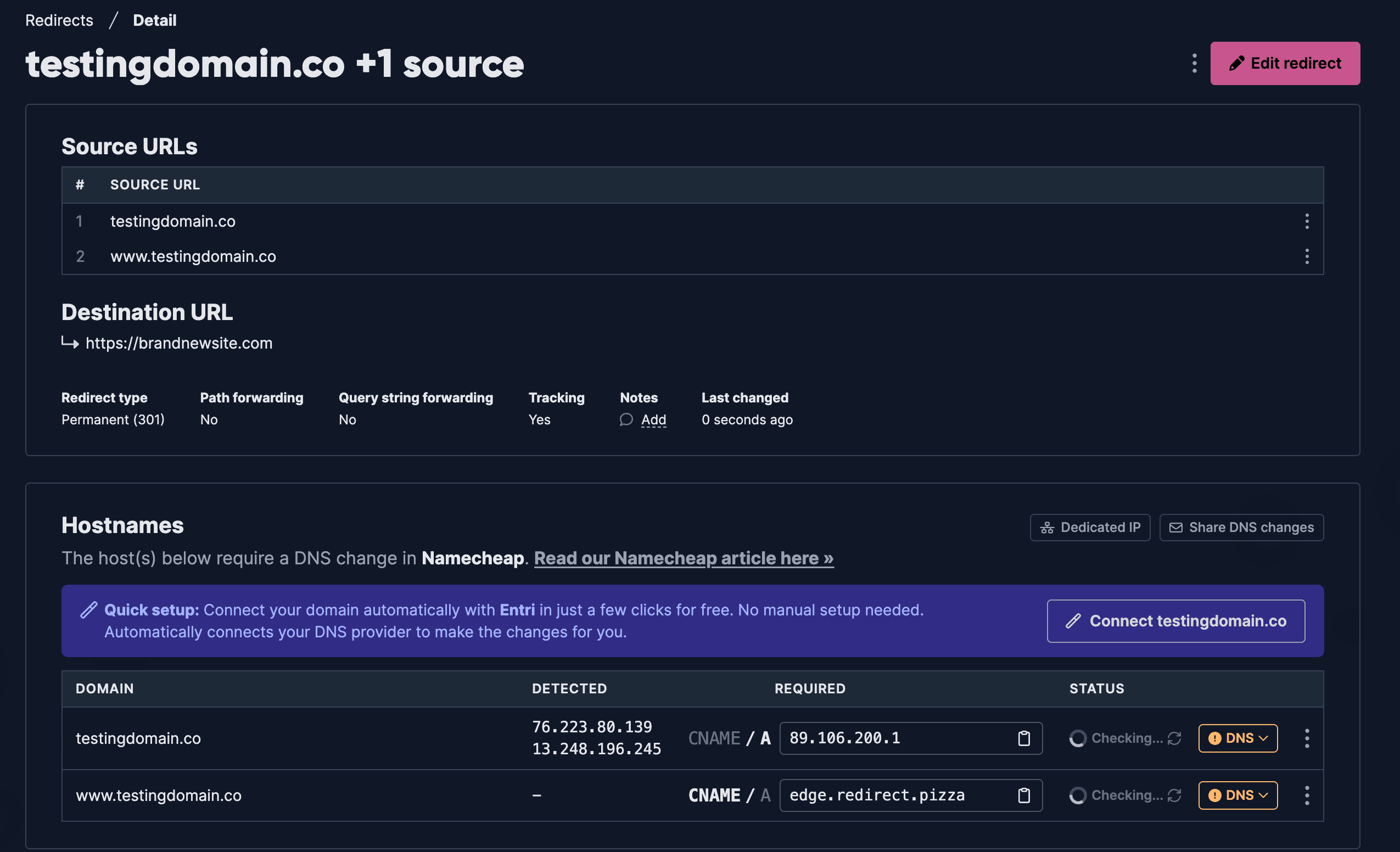
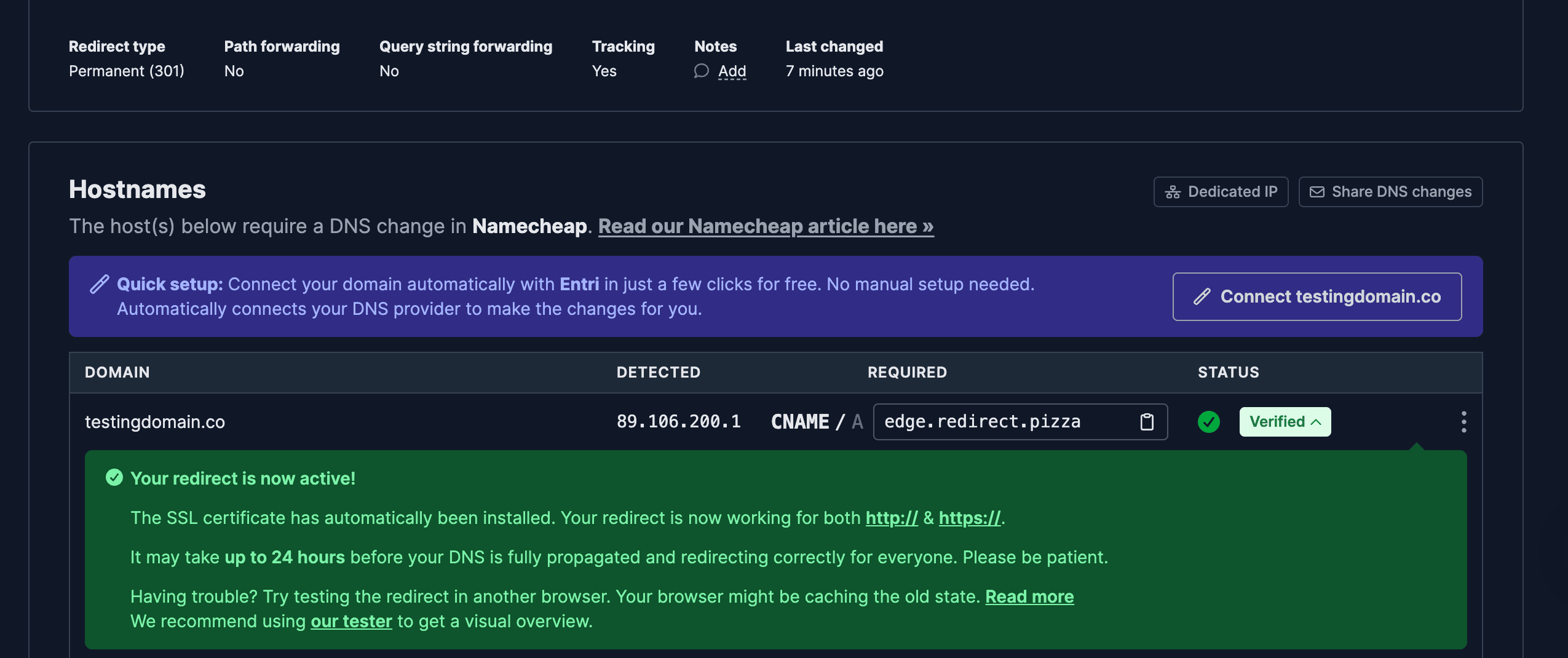
The status column starts at Checking while redirect.pizza waits on the DNS change. Add the CNAME or A record shown at your registrar, in this example, Namecheap and once it propagates, the status flips to Verified and the redirect goes live over both HTTP and HTTPS.
The Analytics tab is locked on the free tier. It only unlocks once you move to a paid Basic plan or higher, so factor that in if traffic reporting matters for your use case.

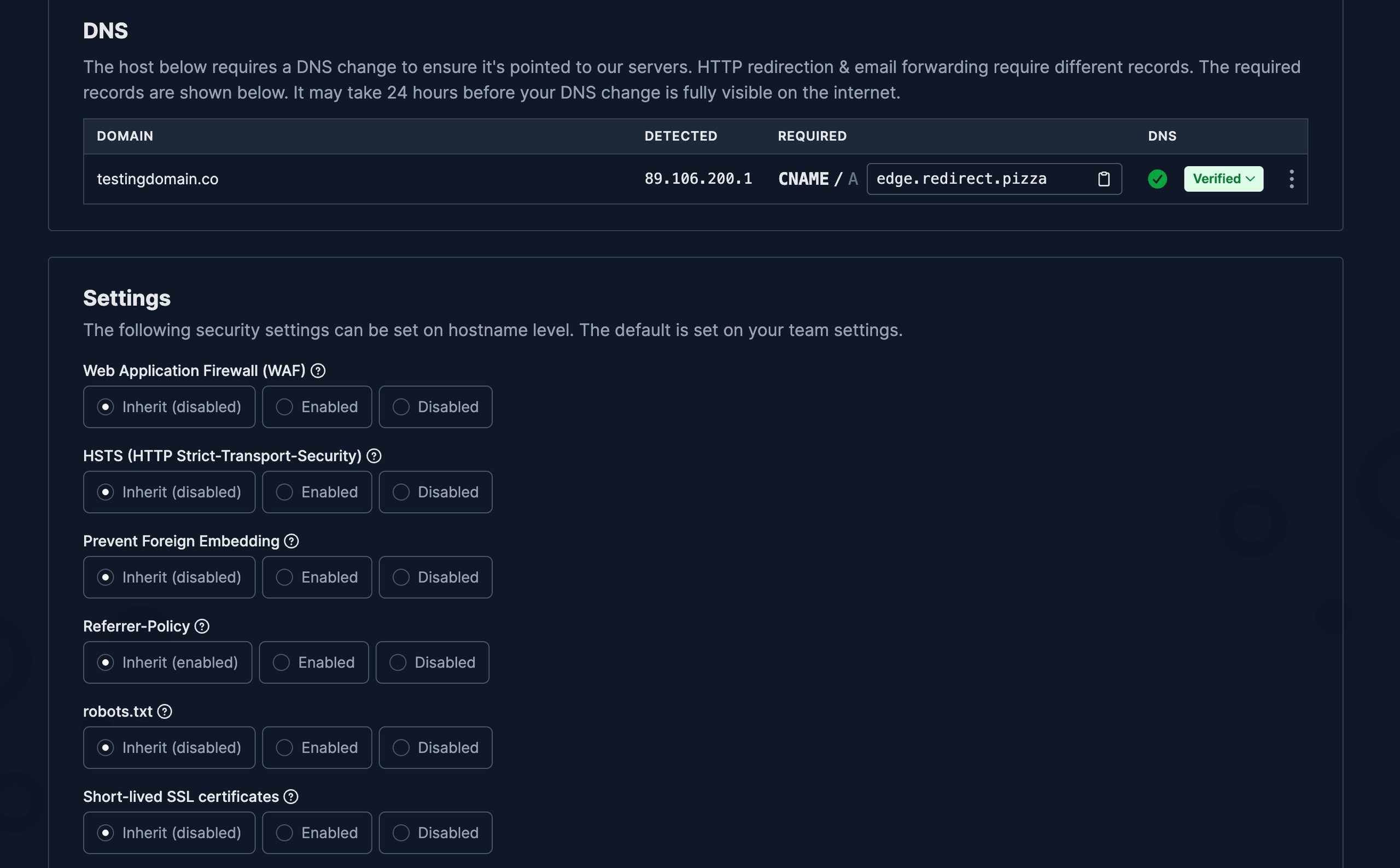
Each hostname also has its own security settings, covering the web application firewall, HSTS, anti-embedding protection, referrer policy, robots.txt behavior and short-lived SSL certificates. Everything defaults to inheriting your team-level settings, so you only need to touch these if this particular redirect needs different rules.
redirection.io
Best for: developers and SEO teams that want control inside their own stack.
redirection.io takes a different shape from the hosted services above. It runs as a compiled proxy that sits in your request path, installed on your own infrastructure or run for you as a managed instance. Because it proxies live traffic, it can redirect individual URLs while the rest of the site serves from the origin and it can also modify responses that are not redirects at all, rewriting things like response headers, meta tags and robots.txt on requests that pass through to the origin.
Full comparison: urllo vs redirection.io.
Reliability and performance
The agent runs locally with a compiled ruleset, so redirects keep firing even if the vendor's control plane goes down and a single agent handles a very high request rate with sub-millisecond rule processing.
Because the proxy is deployed per customer rather than behind a shared hostname, there is no common endpoint to monitor. On self-hosted deployments, reliability depends on the infrastructure you run it on and neither deployment option carries the 100% uptime SLA that hosted networks offer.
Pricing
Starts free, capped at 10 rules and a single day of detailed logs. Self-serve Starter is €20 a month billed yearly or €25 billed monthly, capped at 100 rules, with a 15-day trial and one week of detailed traffic logs. Pro starts at €150 a month, with the final price quoted after a call.
Features
Beyond 301 and 302 redirects, path and query forwarding and automatic SSL on managed instances, its rules engine also manages meta tags, response and security headers, structured data, robots.txt and sitemap.xml, with recipes for jobs like blocking AI crawlers. Paid projects add a website crawler and a redirect map generator. Bulk import and export, an API, role-based access, SSO and audit logs are present.
It does not offer branded links, vanity URLs or QR codes and the platform is powerful but harder to navigate than a hosted dashboard, which matters if non-technical teammates need to make changes safely.
Security
Role-based access, SSO and audit logs, with the option to keep data on infrastructure you own when self-hosted. The company is based in Paris and states that all platform data is hosted in France, which keeps GDPR alignment simple for EU operations. It does not publish a SOC 2 attestation.
Demo
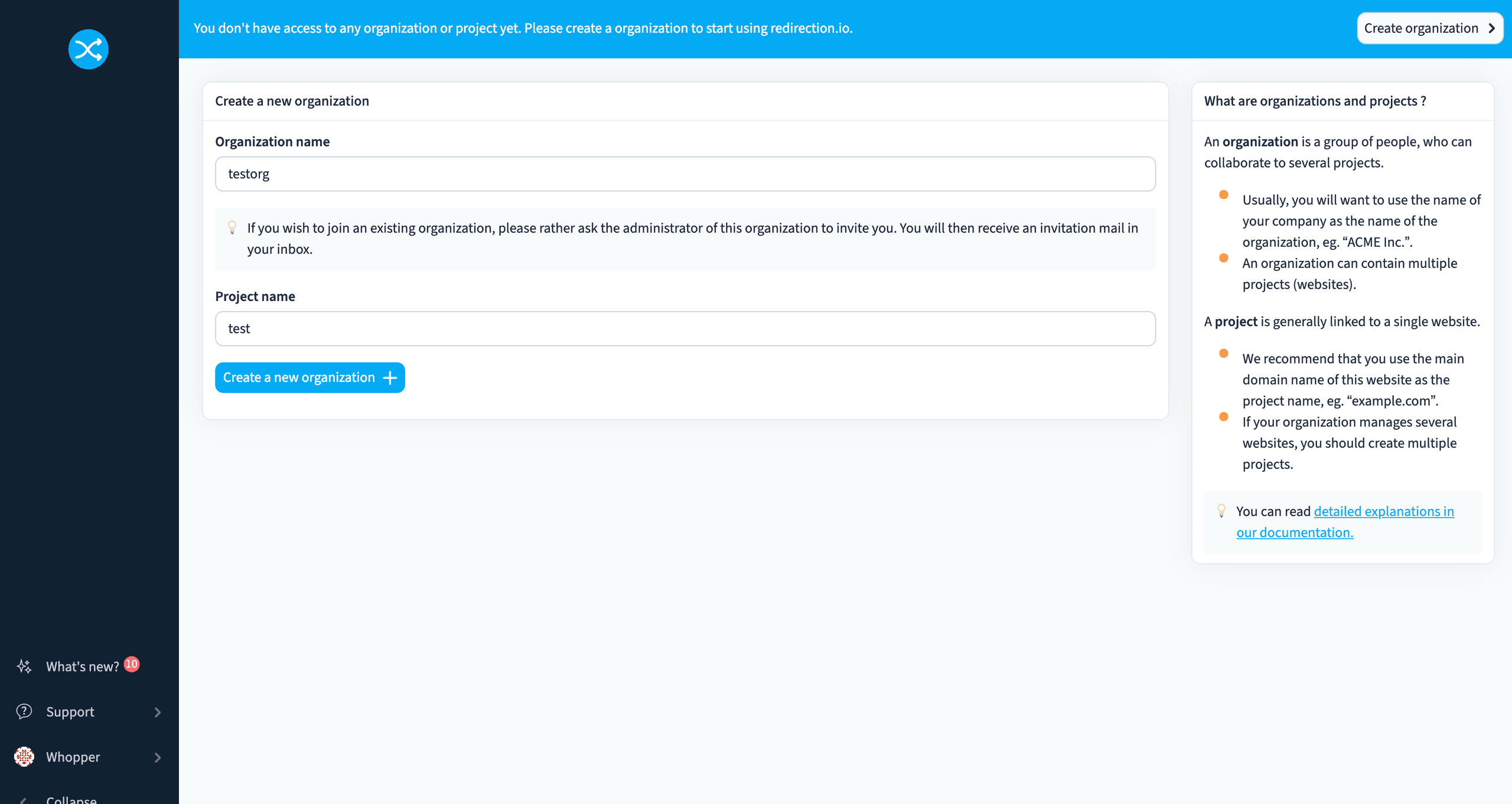
The first step is administrative rather than technical: create an organization and a project before you can configure any redirects. A project maps to one website, so a company managing several domains would set up a project for each.
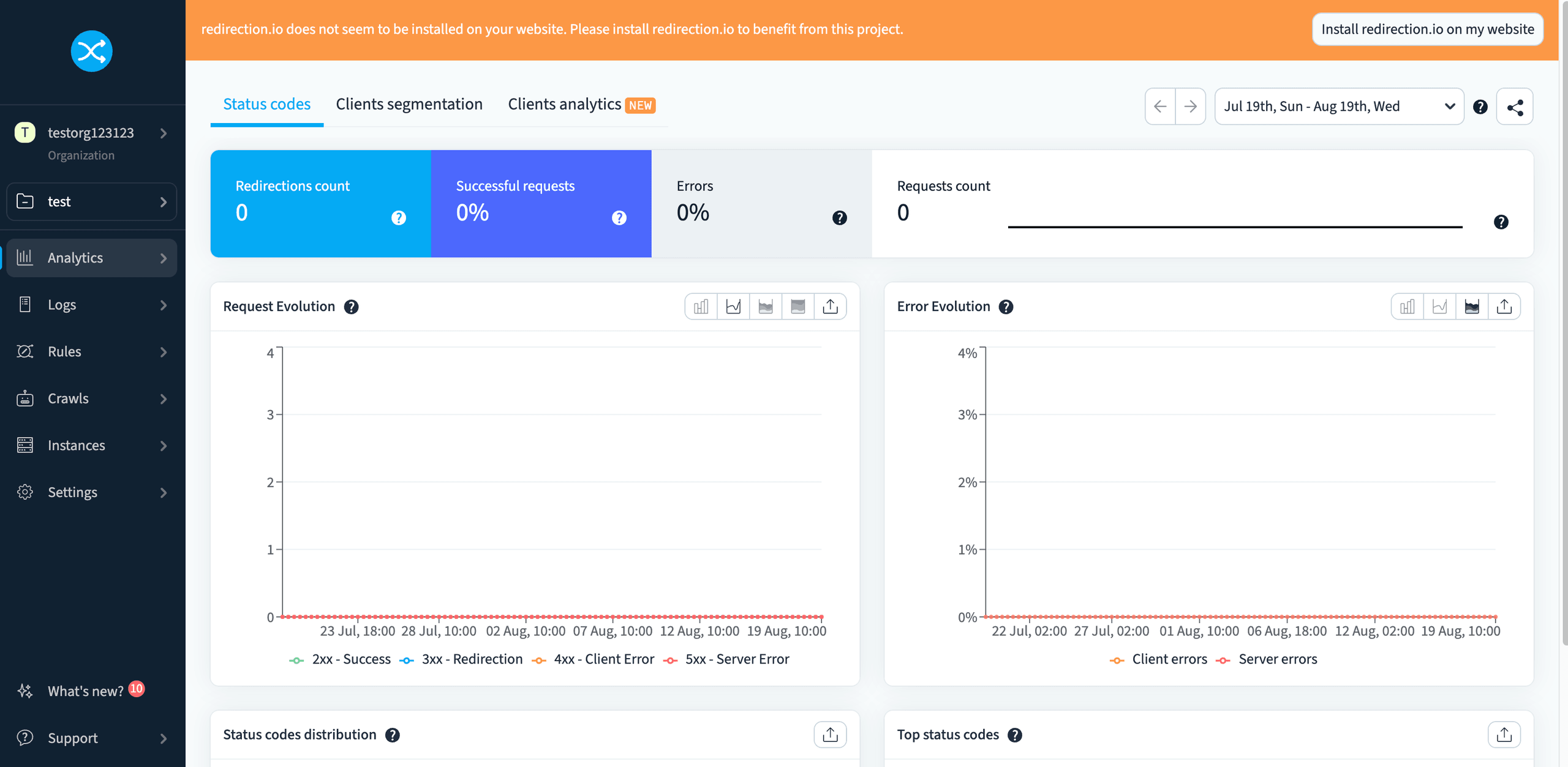
The Analytics tab stays flat at zero until redirection.io is actually installed in front of your traffic, the banner at the top is a reminder that the project exists but is not yet doing anything. Once installed, this same view fills in with live request counts, error rates and status code breakdowns.
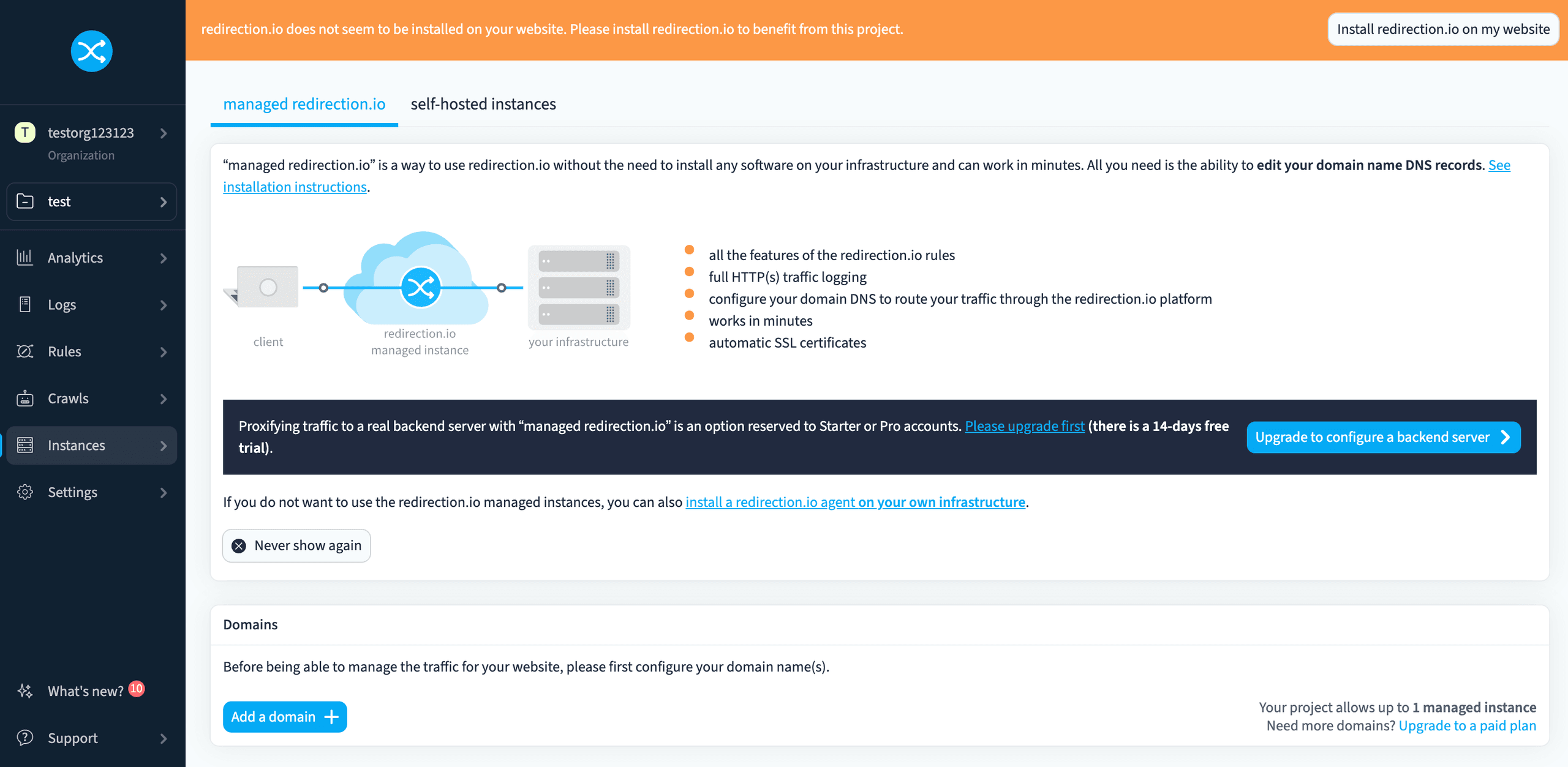
Unlike the hosted services above, redirection.io cannot be evaluated end-to-end from the dashboard alone. The proxy has to be installed in the request path first, through a server module, a container or a managed instance, which means a deployment change and engineering time before the first redirect fires. For teams with that capacity, it is the source of the product's strength, since rules run locally and survive a control plane outage. For teams without it, the redirect program stays blocked on the same developer queue that a managed service is meant to remove.
SiteDetour
Best for: campaigns where the redirect itself adapts per visitor.
SiteDetour is a hosted redirect service built on AWS. Its distinctive strength is adaptive routing: it is strongest when the redirect is the campaign and you want it to change based on the visitor.
Full comparison: urllo vs SiteDetour.
Reliability and performance
It publishes a 99.95% uptime SLA, a lower commitment than a 100% enterprise SLA. In third-party monitoring for May 2026, SiteDetour's tested endpoint recorded a 674 ms response time and four outages, against urllo's 295 ms and zero outages, so urllo was roughly twice as fast over the month. Point-in-time monitoring is not a forecast, but the SLA figure is SiteDetour's own stated commitment.
Pricing
Paid plans described as straightforward, with enterprise available on request. SiteDetour charges $12/month on their lowest paid plan, with no free plan available. SiteDetour offers a 14-day trial.
Features
Automated HTTPS, path-based redirection rules, DNS zone apex support, real-time traffic statistics, a public API and 301 and 302 redirects, all on AWS infrastructure.
Security
Built on AWS hosting, which covers the infrastructure layer: data centre security, network isolation and baseline DDoS absorption. It does not cover the application layer. SiteDetour does not appear to publish a security page, trust center, SOC 2 attestation or GDPR statement.
Demo
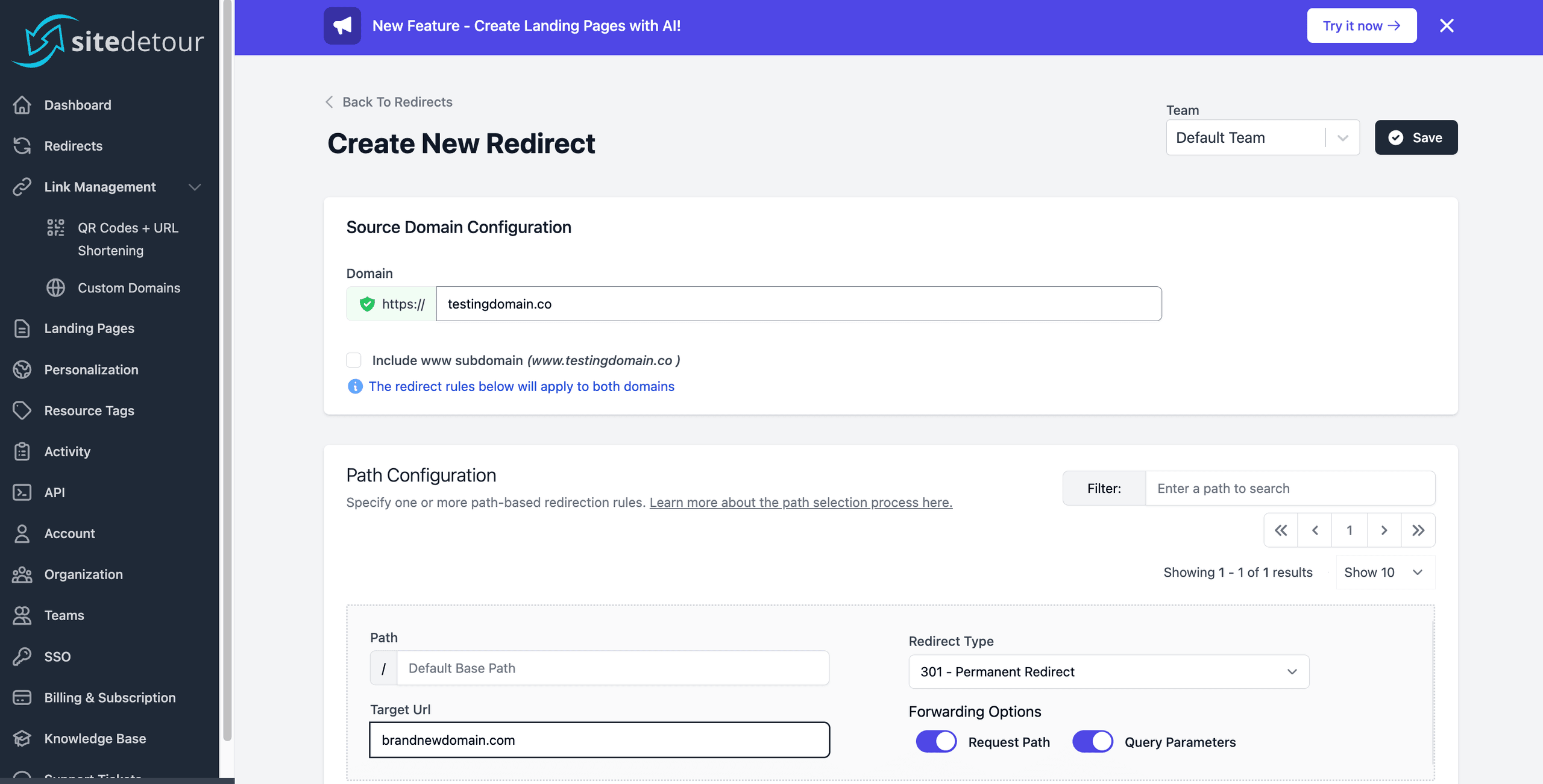
Under Create New Redirect, enter the source domain, then configure a path rule with its target URL, redirect type and whether to forward the request path and query parameters. SiteDetour scopes path rules per domain, so you can layer several under one source hostname.
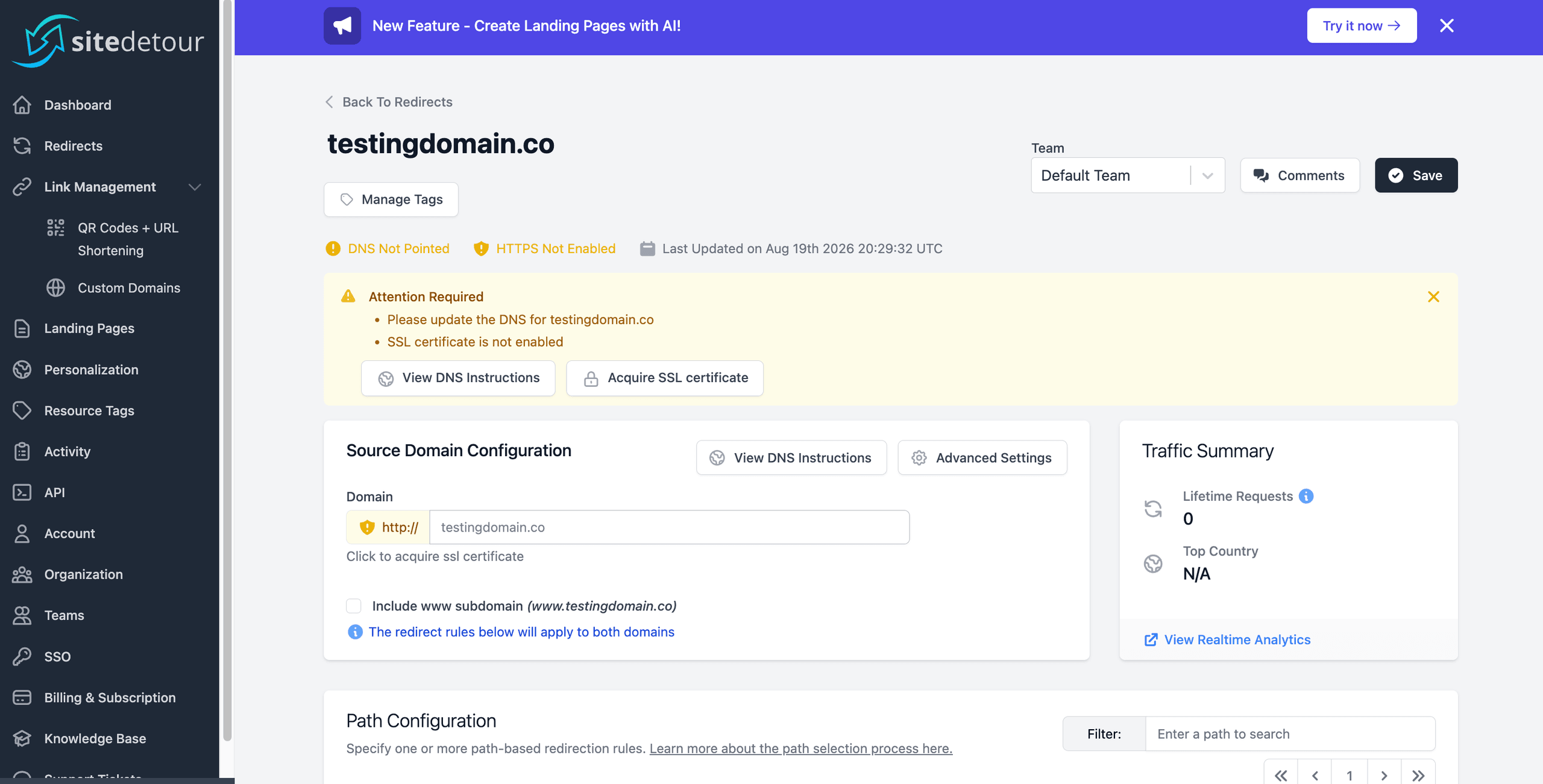
The new redirect starts flagged as DNS Not Protected and HTTPS Not Enabled, with an Attention Required banner and zero lifetime requests since nothing is pointed at it yet. Click View DNS Instructions to see what needs to change at your registrar.
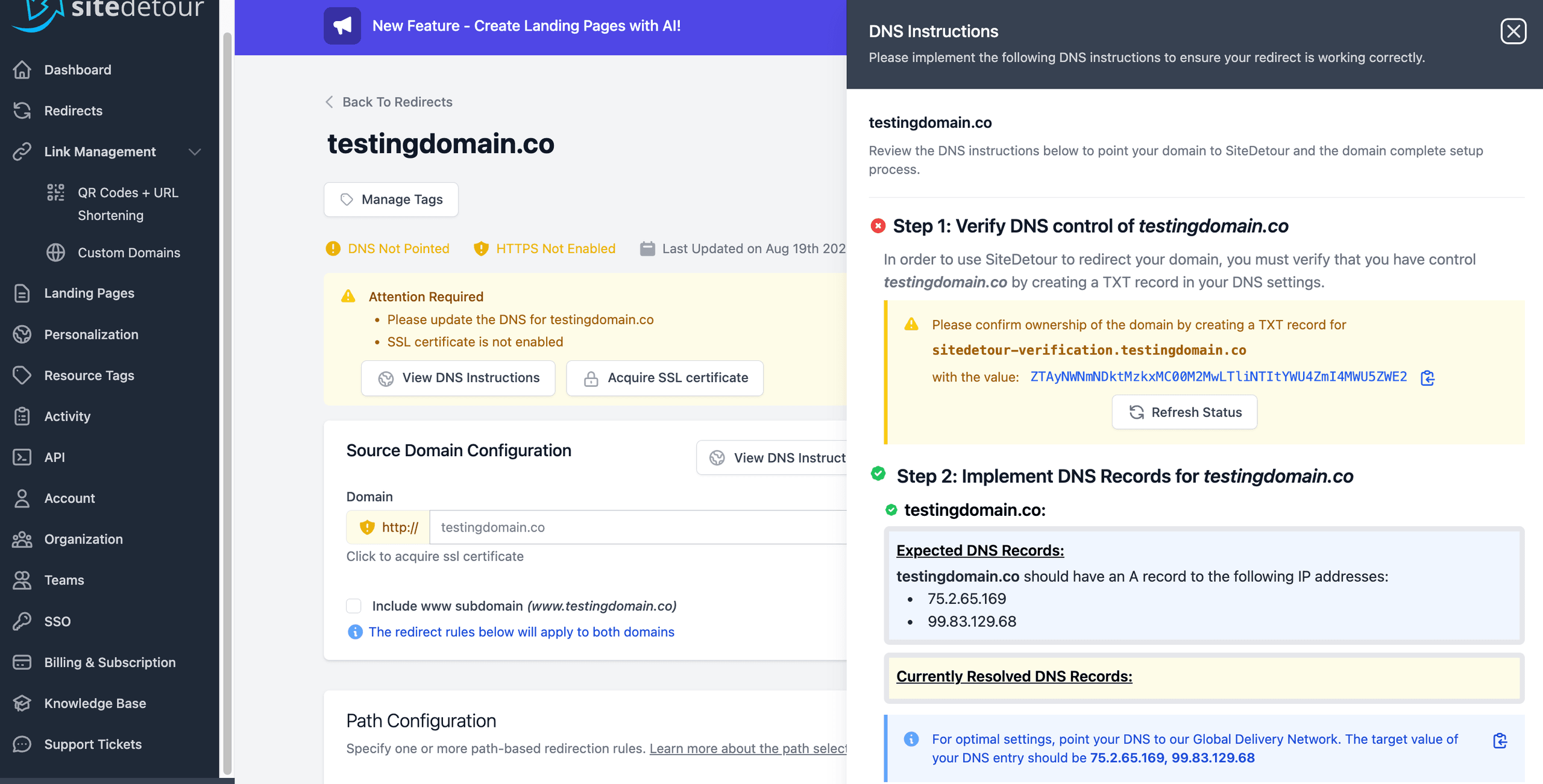
Setup happens in two steps: first you verify domain ownership with a TXT record, then you point an A record at the IP addresses SiteDetour provides. The panel shows what is currently resolved next to what is expected, so you can confirm the change took effect.
RedirHub
Best for: teams that want a permanent free tier or specific routing features.
RedirHub is a managed redirect and link platform founded in 2019, positioned as a modern replacement for registrar forwarding and self-hosted redirect servers. Full breakdown: urllo vs RedirHub.
Reliability and performance
It runs a global edge network with routing designed to serve requests from nearby locations and offers a 100% uptime SLA on its Enterprise plan. Its published uptime comes from its own monitoring rather than an independent third party. For teams where redirects are business-critical, it is worth looking past the headline SLA to the details behind it: how wide the network coverage actually is, whether uptime is independently verifiable and what the SLA specifically commits to.
Pricing
A permanent free tier with no credit card required, plus paid tiers and a 14-day trial. Pricing meters monthly requests as well as hostnames, so request ceilings rise by tier and unlimited traffic only arrives at the top. The basic plan starts at $10/month with 15 source hostnames.
Features
Automatic HTTPS, path and query forwarding, QR codes and branded links, bulk import and export, an API, roughly 12 months of analytics history, team roles and 2FA, with SSO as an add-on. It adds several things urllo does not: destination health monitoring, multiple-destination A/B routing, custom HTML responses and both iframe and masked redirects.
Security
Role-based access, audit logs, two-factor authentication, encryption in transit and at rest and SSO. Data residency means choosing where your data lives. RedirHub stores data in both the US and the EU but does not appear to offer that choice. It does not appear to publish a SOC 2 Type 2 attestation or a public GDPR statement.
Demo

Signing up starts with a short onboarding survey rather than dropping you straight into the dashboard. Answering how you heard about RedirHub just tailors the tips you see next, it has no effect on how redirects work.
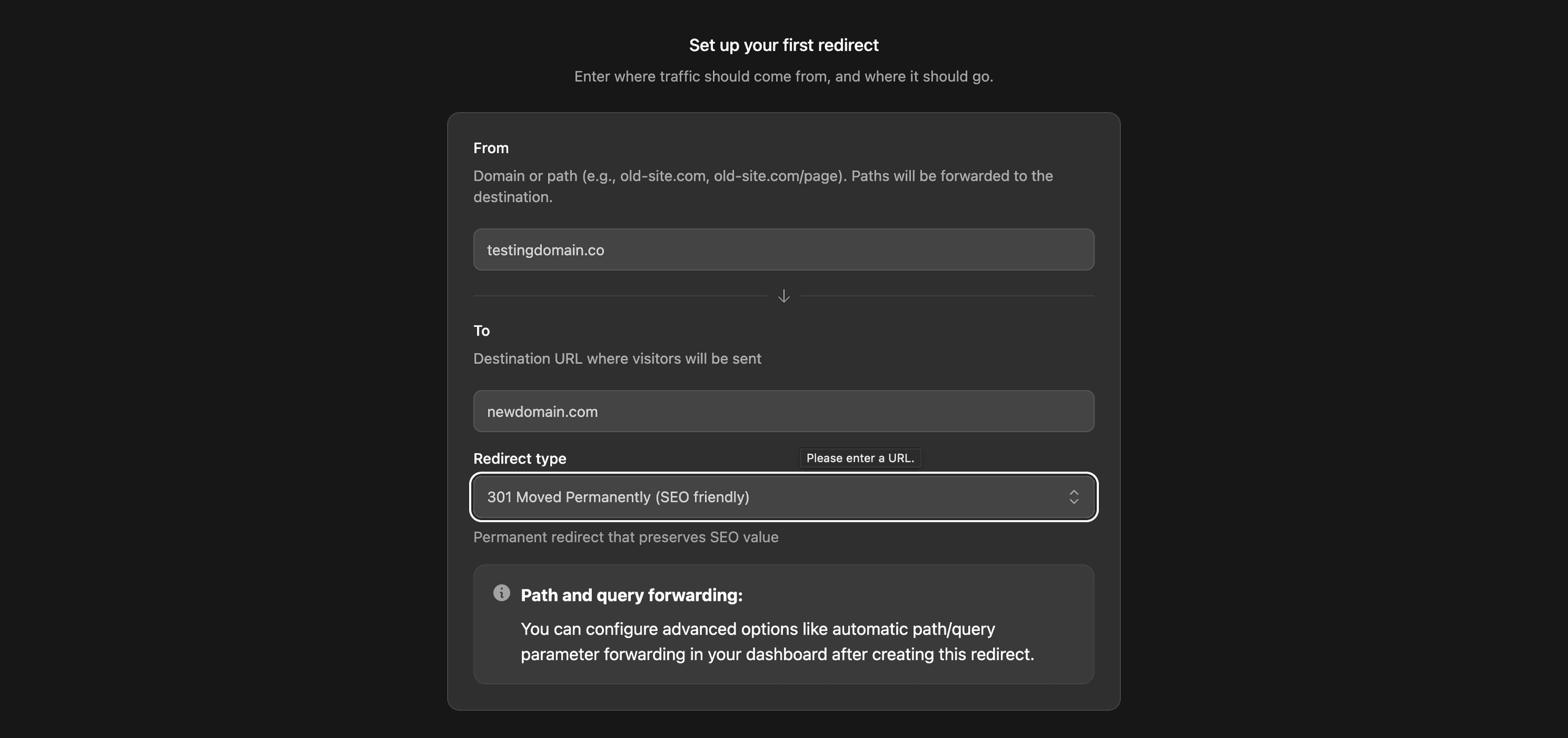
Enter the domain or path you want to redirect from and the destination it should send visitors to, then pick a redirect type. RedirHub defaults to a 301 for SEO value and leaves path and query forwarding as an advanced option you can turn on after the redirect exists.

RedirHub creates the redirect immediately on its global edge network and reports the average response time you can expect. From here you can connect your own domain, jump into the dashboard or start on another redirect right away.
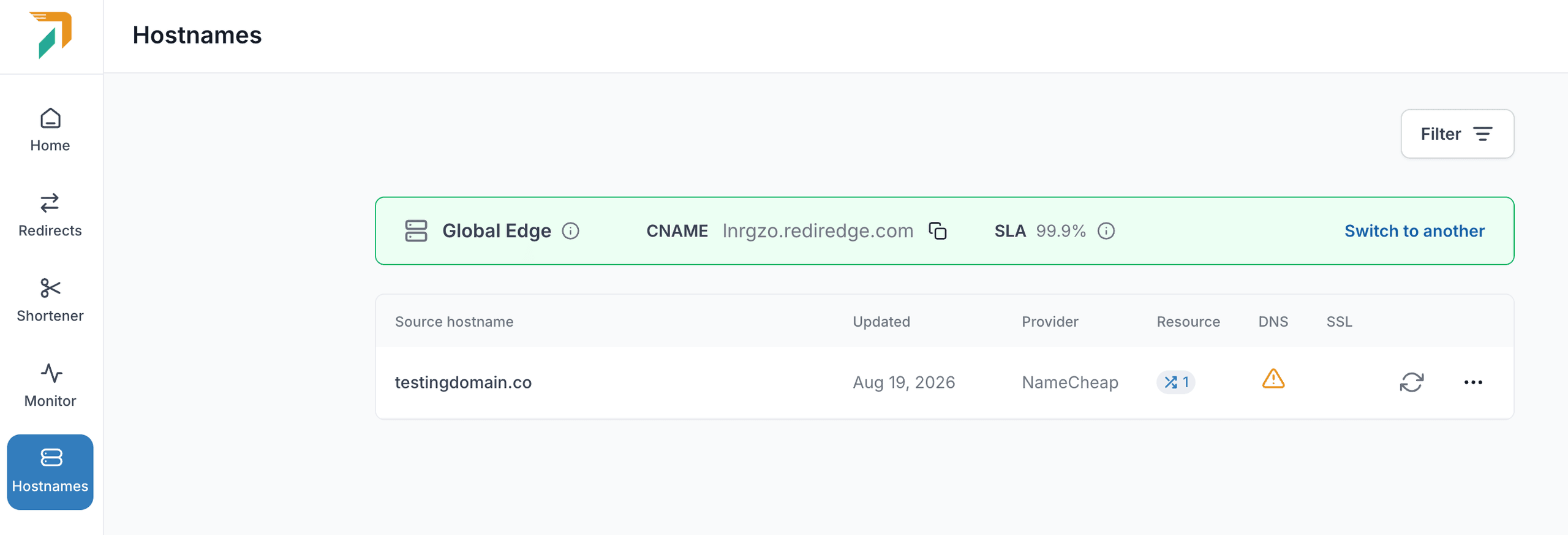
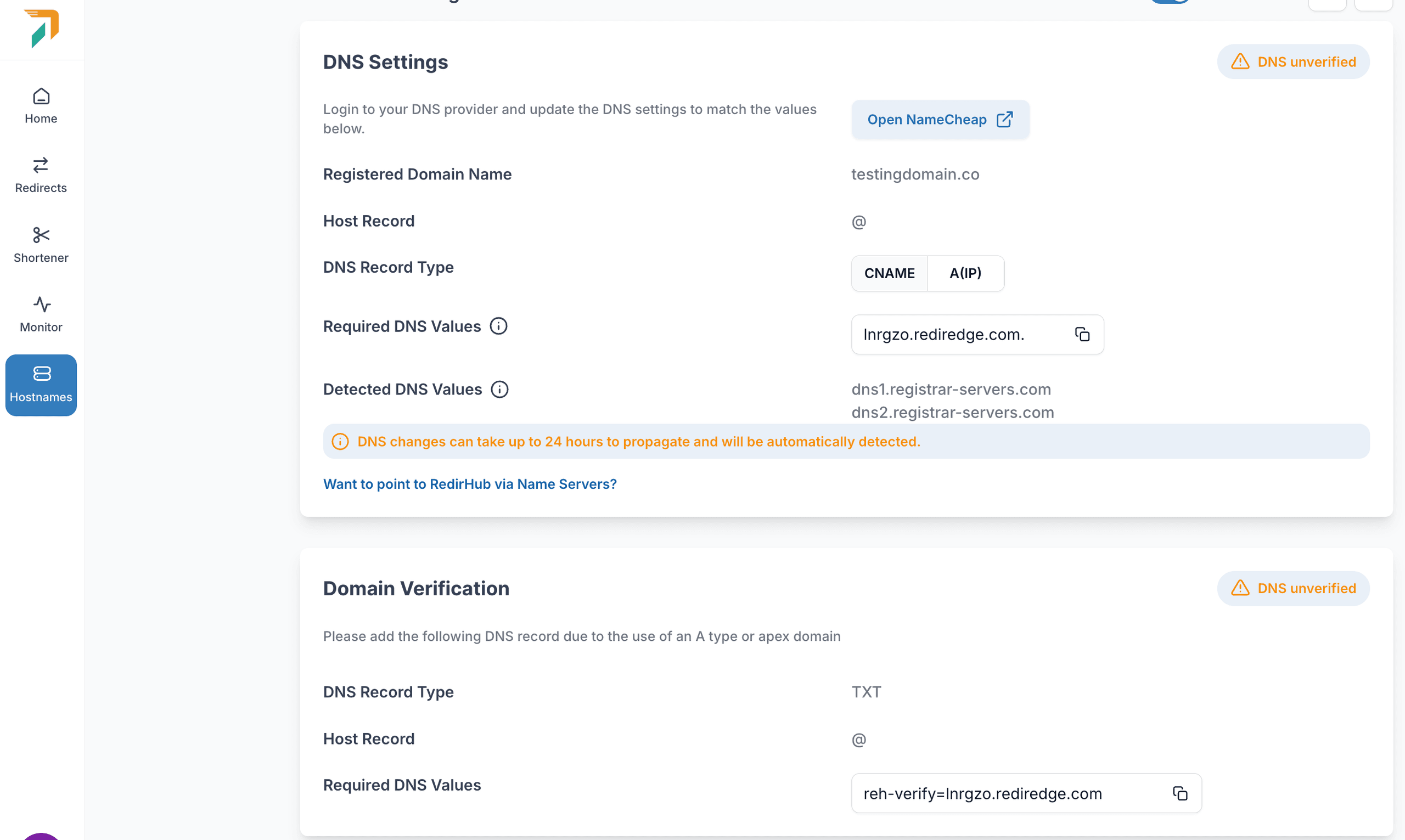
The Hostnames page lists every domain on your global edge network alongside its DNS and SSL status. The warning icon next to testingdomain.co flags that the CNAME record still needs to be added at your registrar, in this example, Namecheap, before the redirect is fully live.
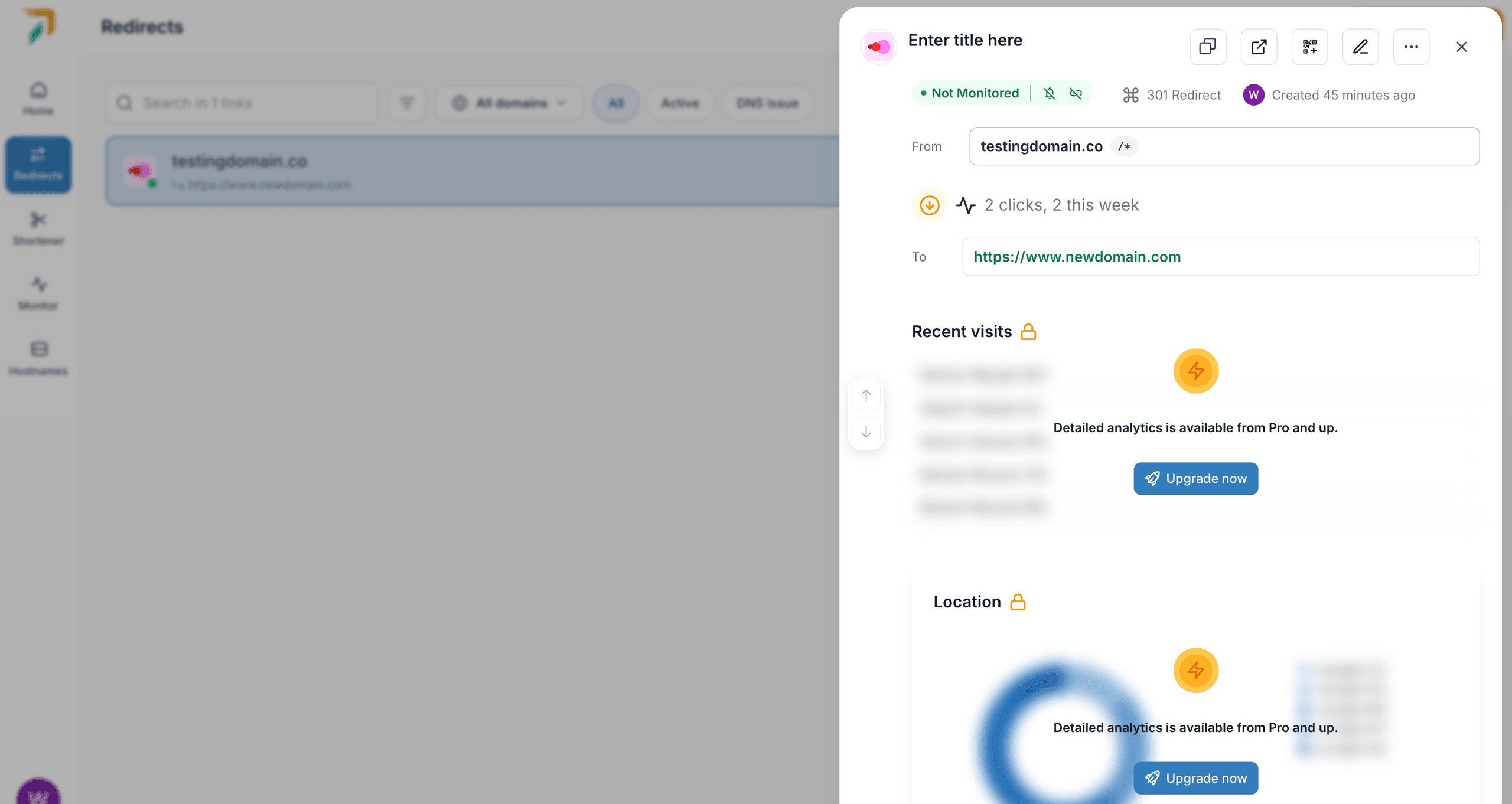
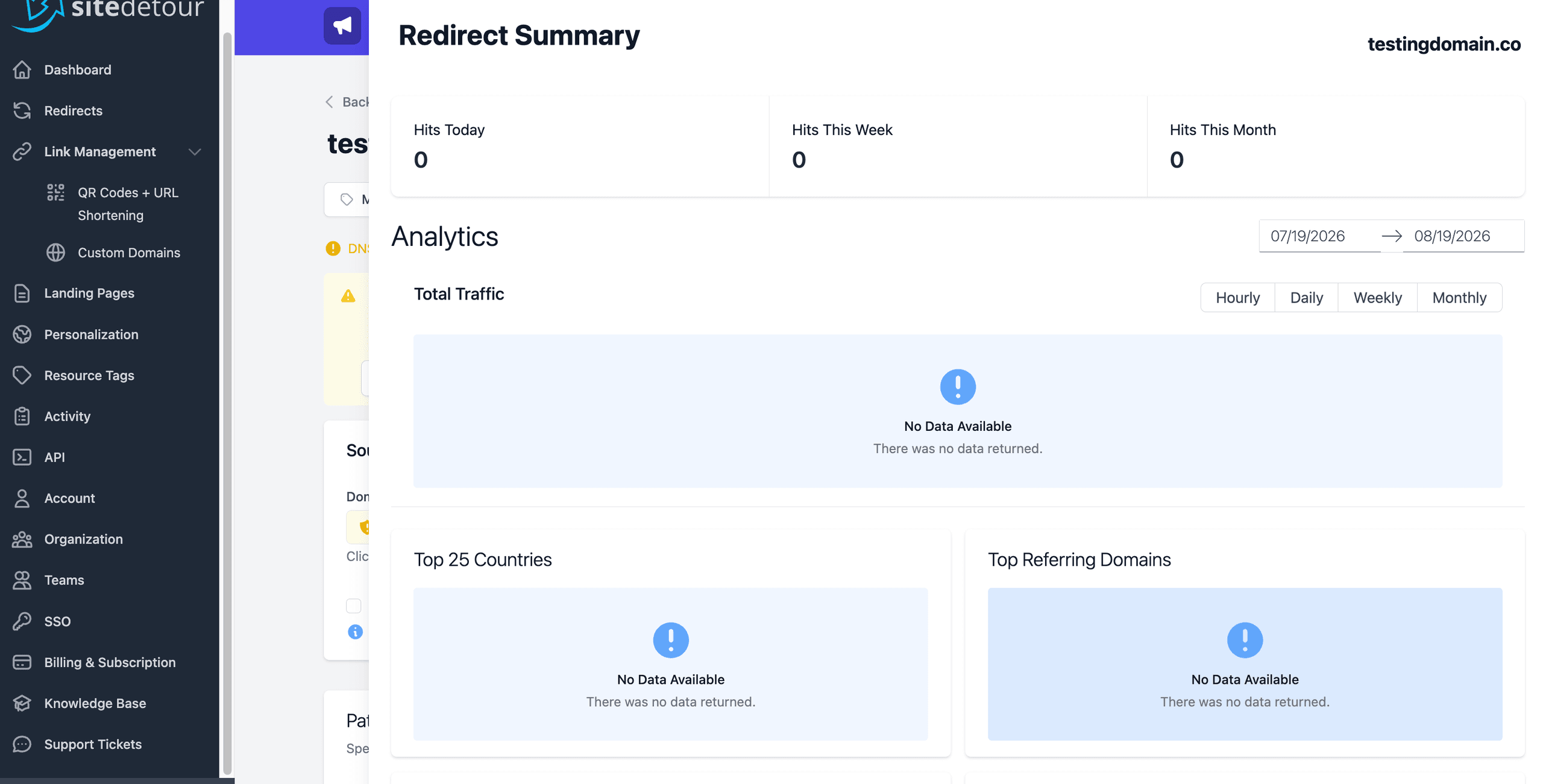
The per-visit detail, individual visit timestamps and the location breakdown is gated behind the Pro plan. On lower tiers, this panel stays blurred with an Upgrade now prompt instead of real data.
So who should you choose?
URL redirector tools are essential for modern web management, site migrations and reliability. The right redirect service gives teams the analytics, flexibility, reliability and control that free redirect tools often lack.
As redirect needs grow, choose a platform that is actively maintained, supported by a dedicated team and capable of scaling with your business. A strong redirect strategy should protect user experience, preserve SEO value and give your team confidence as websites, campaigns and domains change.
Choose by goal:
- Redirects are business-critical infrastructure: urllo.
- You have a hobby domain and a tight budget: redirect.pizza.
- You need on-premise deployment or in-depth technical SEO controls: redirection.io.
- Per-visitor campaign personalization is the main use case: SiteDetour.
- Destination health monitoring or redirect masking are must-have features: RedirHub.
If you need a reliable, flexible and professional URL redirect service, urllo can help. urllo is trusted by 1,000+ companies, used by customers in over 75 countries, including numerous organizations with 10,000+ employees and handles more than 25 billion requests per year. Explore our plans or start a free trial today.
Frequently asked questions about URL redirectors
What is a URL redirector and how does it work?
A URL redirector is a service that automatically forwards visitors from one URL to another using 301 and 302 status codes. When someone opens a redirect link, the service matches it to a rule and sends them to the destination almost instantly. A 301 tells browsers and search engines the move is permanent, which preserves SEO value, while a 302 signals a temporary move. Managed redirectors also handle SSL automatically and can log request details like location, device and timestamp when you need that visibility.
Are free URL redirector services reliable?
For basic or low-risk redirects, a free tier can be perfectly fine, and many now include things that used to be paid, like automatic HTTPS. Where free plans typically stop short is the reliability and governance production depends on: an uptime SLA you can hold the provider to and team controls like SSO, role-based access and an audit log of who changed what. Some also cap traffic, domains or support. For anything business-critical, compare the specific limits of the free tier against your reliability, governance and support requirements rather than assuming either way.
How do I set up automatic URL redirects?
Setting up redirects usually means choosing a service, creating your source-to-destination rules and pointing your domain at the service with a DNS change at your registrar. Managed services handle SSL/TLS automatically, so HTTPS works without manual certificate steps and they support path and query forwarding so visitors land on the right page and tracking stays intact. Larger projects and migrations are typically done with a bulk import rather than one rule at a time.
Do URL redirectors affect SEO rankings?
Yes, depending on the status code. A 301 signals a permanent move and tells search engines to consolidate ranking signals on the destination, which is what you want during a migration or domain consolidation. A 302 signals a temporary move, so search engines generally keep showing the original URL. Preserving paths and query parameters matters too, since it keeps deep links and campaign tracking from breaking when URLs change.

By Sarah Ellis
Director of Enterprise Accounts
Sarah is a passionate sales and management leader with over two decades of experience in the start-up, technology, real estate and music/advertising sectors. Sarah started her entrepreneurial journey years ago when she founded and ran her own bakery. Which is why she’s still the premier source of baked goods inside the urllo office.




.png&w=2560&q=88)